
Bindings
{name} anywhere in an attribute value declares a binding. The same name used in several places is one property; write to it once and everything using it updates.
<text text="{status}"/>
<text key="shop.owned" args="{count} {itemName}"/>
<button disabled="{soldOut}" onclick="Buy" key="shop.buy"/>
<panel if="{isVip}"> ... </panel>
The name is camelCase in markup and PascalCase in C#: {playerName} gives PlayerName.
The type comes from where it is used
| Used as | C# type | Property |
|---|---|---|
text="{s}", args="{s}", input bind | string | string S { get; set; } |
if="{b}", disabled="{b}", selected="{b}", toggle bind, modal enabled | bool | bool B { get; set; } |
slider bind | float | float F { get; set; } |
select bind, tabs bind | int | int I { get; set; } |
Using one name with two different types is an error (AUI108). Pick two names.
An if binding starts true, so a view renders complete before your code has run.
Two-way controls
A toggle, slider, select, tabs or input bound to {x}:
- Player uses it →
Xis written, then youronchangehandler runs. - You set
Xfrom code → the control moves and your handler does not run.
That asymmetry is deliberate. It means Volume = 50f in OnStart cannot recurse into VolumeChanged, and it means a handler can safely write other bindings.
<slider bind="{volume}" min="0" max="100" step="1" onchange="VolumeChanged"/>protected override void OnStart()
{
Volume = 70f; // moves the slider; VolumeChanged is not called
}
public void VolumeChanged(float value)
{
// runs only when a player drags it; Volume has already been updated
if (audio != null) audio.SetVolume(value / 100f);
}Text bindings
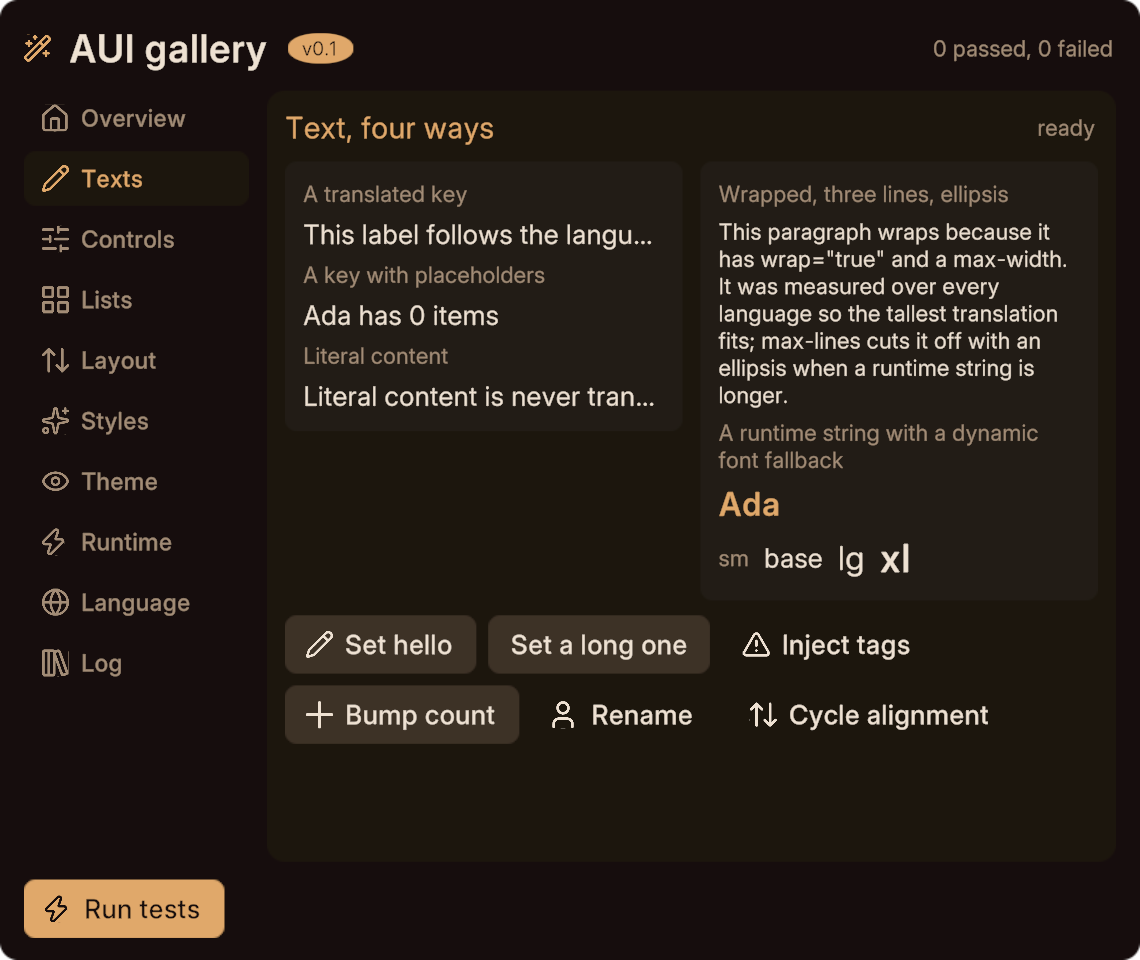
Three ways to put text on screen:
<text key="shop.title"/>                       <!-- translated, no binding -->
<text text="{status}"/>                        <!-- a runtime string -->
<text key="shop.owned" args="{count} {name}"/> <!-- translated, with placeholders filled -->
args maps bindings onto the {placeholder} names inside the translated string, by name. If shop.owned is "You own {count} {name}", then Count fills {count}. A placeholder with no matching binding is diagnostic AUI304; a binding listed in args that the string never uses is AUI307.
Up to four placeholders per string are supported.
Escaping
String bindings are escaped when set. A < becomes < followed by a zero-width space, so TextMeshPro's rich text parser does not see a tag:
PlayerName = Networking.LocalPlayer.displayName; // "<color=red>Bob" renders literallyThe getter returns the escaped string, not what you passed in. If you need the original, keep your own copy.
This applies to every string that reaches a text element, including args values and SetText(elem, s). You never have to sanitise a player name yourself.
Conditional elements
if="{flag}" shows and hides an element and frees its space: siblings move up, and the layout re-solves.
<panel if="{isVip}" class="card">
  <text key="vip.perks"/>
</panel>IsVip = Networking.LocalPlayer != null && Networking.LocalPlayer.isVRCPlus;This is a different thing from hidden, which is a static authoring attribute, and from display: none in a stylesheet. For hiding an element by index from code, see SetActiveElem.
Bindings in class and style
A binding can supply part of a class list or a style value:
<panel class="card {tone}"/>
<panel class="bar"><panel class="fill" style="width: {progress}"/></panel>Tone = "warm"; // the card is now class="card warm"
Progress = "50%"; // lengths are strings; colours are ColorStyle bindings take the type the property needs: a length or an enum is a string, a colour is a Color, a number is a float. Mixing a binding with literal text in one value is an error (AUI213), so write style="width: {progress}" and not style="width: {n}mm".
See changing a view at runtime for what is bindable.
Item bindings inside a list
Inside a <repeat> or <template>, {item.something} is a per-row binding and becomes a setter taking the row:
<repeat id="rows" max="8">
  <panel class="row">
    <text text="{item.name}"/>
    <text text="{item.score}"/>
  </panel>
</repeat>RowsCount = 3;
SetRowsName(0, "Alice");
SetRowsScore(0, "120");Using {item.x} outside a repeat or template is AUI118. See lists.
Next
- Handlers, the other half of the contract with your code.
- Lists for per-row bindings.
- Changing a view at runtime for everything bindings cannot express.